Trigger an agent with a webhook
Send a message with curl and watch the agent respond in STUI. This local demo requires a configured LLM provider.
Configure the Skiller server
Section titled “Configure the Skiller server”Skiller includes a local HTTP server that receives webhooks and resumes waiting agents. Start it and check its status:
skiller server startskiller server statusThis demo runs locally. To receive requests from another machine or a service such as Telegram, expose the server through an HTTPS endpoint with webhook authentication. Telegram also requires adapting its payload and sending replies through its API; this demo does not include that integration.
Create an agent that listens for webhooks
Section titled “Create an agent that listens for webhooks”The loop waits at a webhook step, passes the received message to the agent, and returns to listening after each response.
Agent flow
Section titled “Agent flow”Create agent-wh/agent-wh.yaml in your working directory:
name: agent-whdescription: "An agent that receives tasks through a webhook"version: "0.1"start: wait_task
steps:  - wait_webhook: wait_task    webhook: agent-wh    key: inbox    next: respond
  - agent: respond    config:      file: "./agent-wh.agent.json"    system:      file: "./system.md"    task: '{{output_value("wait_task").payload.message}}'    tools: []    next: wait_task
System prompt
Section titled “System prompt”Create agent-wh/system.md:
You are a helpful assistant receiving tasks through a webhook.Respond to the task in the language of the message. Keep answers brief and practical.You have no tools and cannot perform external actions.Agent profile
Section titled “Agent profile”Create agent-wh/agent-wh.agent.json. This profile inherits the configured provider and model. No tools are exposed to the agent.
{ "tools": { "shell": { "allowed_commands": [], "allowed_paths": [], "allowlist_enabled": true }, "files": { "read": [], "write": [], "all": [] } }}Register the webhook
Section titled “Register the webhook”skiller webhook register agent-wh --auth token --token-header X-Webhook-TokenKeep the returned secret private. It authenticates requests that send tasks to the agent; anyone with the secret and endpoint URL can submit tasks.
Observe in STUI
Section titled “Observe in STUI”Launch skiller from the directory containing agent-wh/, then enter:
/run ./agent-wh/agent-wh.yamlKeep this run open to observe the agent. It waits for a message on webhook agent-wh, key inbox. Use a single active demo run so each message reaches only this agent.
Simulate a webhook call
Section titled “Simulate a webhook call”In another terminal, set the secret returned during registration and send a message to the local webhook URL, replacing {key} with inbox:
export WEBHOOK_SECRET="YOUR_WEBHOOK_SECRET"
curl --fail-with-body -X POST 'http://127.0.0.1:8001/webhooks/agent-wh/inbox' \  -H 'Content-Type: application/json' \  -H "X-Webhook-Token: $WEBHOOK_SECRET" \  --data '{"message":"Hello! What can you help me with?"}'
Use the host and port returned during registration if they differ from this example. This simulates a request from another machine or external service.
Watch STUI: the agent receives the message, responds, and returns to waiting. Repeat with another message to continue. Each message calls the configured model.
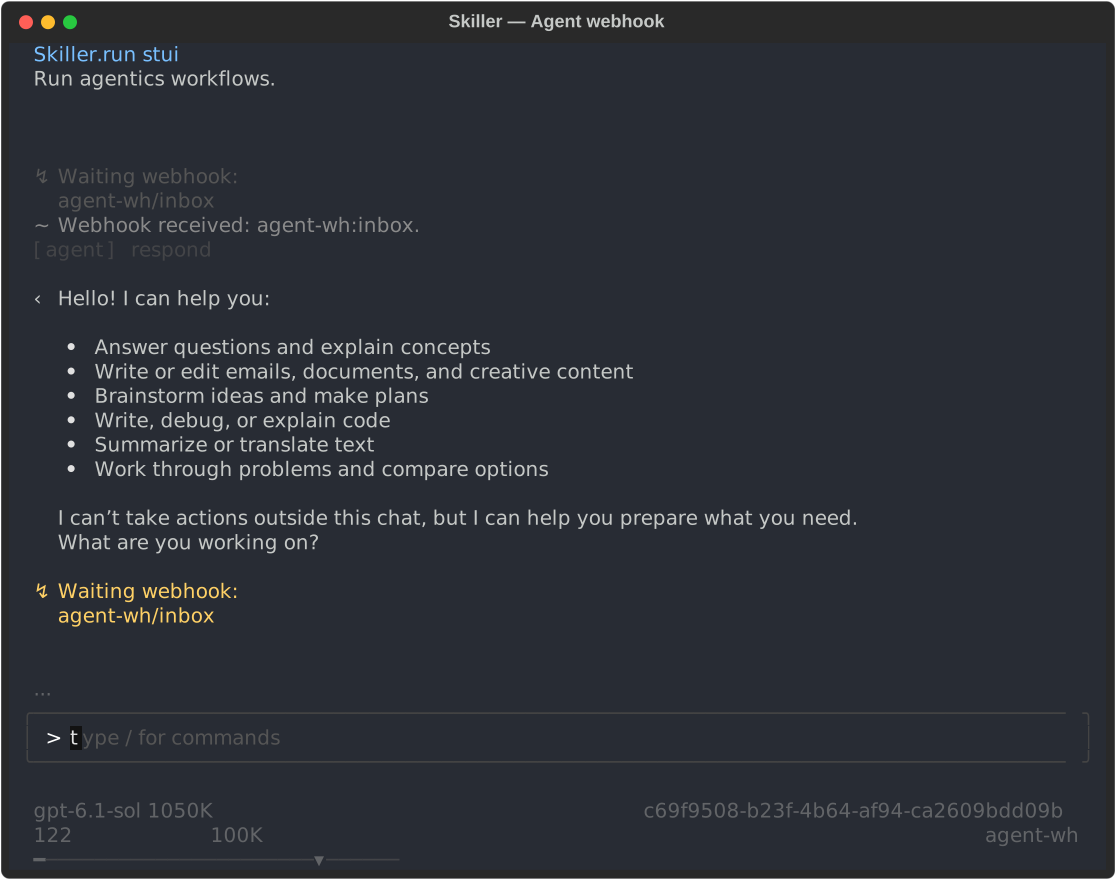
The HTTP response acknowledges delivery; the agent’s answer appears in STUI, not in the curl response.
Cleanup
Section titled “Cleanup”Delete the demo run when finished. Remove the registration if you created it; stop the server only if no other flows need it.
skiller delete <run_id>skiller webhook remove agent-whskiller server stopFind the demo files and CLI E2E script on GitHub.